
Obiettivi | Certificazione | Contenuti | Tipologia | Prerequisiti | Durata e Frequenza | Docenti | Modalità di Iscrizione | Calendario
Il Corso Nutanix Enterprise Cloud Administration (ECA) è indirizzato ai partecipanti che desiderano acquisire competenze operative avanzate nell’amministrazione di infrastrutture enterprise basate su soluzioni Nutanix. Durante il corso vengono affrontati temi avanzati legati all’Hyperconverged Infrastructure (HCI), alla gestione centralizzata tramite Prism Central e Prism Element, e alla governance di ambienti virtualizzati multi-cluster. I partecipanti avranno modo di approfondire l’utilizzo di tecnologie come Nutanix Acropolis (AOS), Prism Central, AHV (Acropolis Hypervisor), Life Cycle Manager (LCM), Nutanix Move per la migrazione dei workload, e le soluzioni per data protection, networking e disaster recovery. Il percorso formativo include la gestione di VM, storage e reti virtuali, la configurazione di politiche di sicurezza, la protezione dei dati e la risoluzione delle problematiche tipiche di ambienti enterprise. Ampio spazio è riservato all’automazione delle operazioni, al monitoraggio delle performance tramite dashboard avanzate, alla gestione e all’ottimizzazione delle risorse di cluster anche in scenari di hybrid e multicloud. Attraverso laboratori pratici, i partecipanti svilupperanno autonomia nell’implementazione, nella manutenzione e nell’aggiornamento dei cluster Nutanix, affrontando casi d’uso reali di business continuity, backup e troubleshooting. Il corso contribuisce alla preparazione dell’esame di Certificazione Nutanix Certified Professional – Multicloud Infrastructure (NCP-MCI).
Contattaci ora per ricevere tutti i dettagli e per richiedere, senza alcun impegno, di parlare direttamente con uno dei nostri Docenti (Clicca qui)
oppure chiamaci subito al nostro Numero Verde (800-177596).
Calling from abroad? Reach us at +39 02 87168254.
Obiettivi del corso
Di seguito una sintesi degli obiettivi principali del Corso Nutanix Enterprise Cloud Administration (ECA):
- Consolidare le competenze nell’amministrazione di ambienti HCI e multicloud tramite Prism Central.
- Gestire VM, storage, reti e sicurezza in cluster enterprise Nutanix.
- Ottimizzare la protezione dati, il disaster recovery e le strategie di business continuity.
- Automatizzare le attività di deployment, monitoraggio, aggiornamento e troubleshooting dei cluster.
- Applicare best practice di Nutanix per la gestione scalabile e resiliente delle risorse IT
Certificazione del corso
Esame Nutanix Certified Professional – Multicloud Infrastructure (NCP-MCI); Questo esame valuta la capacità del candidato di amministrare, gestire e ottimizzare ambienti enterprise basati su Nutanix. Il candidato deve dimostrare conoscenza approfondita delle architetture Hyperconverged Infrastructure (HCI) Nutanix, della gestione dei cluster tramite Prism Central e Prism Element, e del deployment e mantenimento di risorse IT in scenari multicloud e hybrid cloud. L’esame testa le competenze nell’amministrazione di macchine virtuali (VM), storage avanzato, configurazione e gestione delle reti virtuali (networking), politiche di sicurezza, automazione delle operazioni tramite Life Cycle Manager (LCM), e protezione dei dati tramite strumenti di backup e disaster recovery. Il candidato deve inoltre essere in grado di monitorare performance, risolvere problematiche operative, gestire aggiornamenti software e firmware, e implementare soluzioni di workload mobility con strumenti come Nutanix Move.
Contenuti del corso
Getting Started with a Nutanix cluster
- Understand three-tier and HCI
- Understand the Nutanix product portfolio
- Understand nodes, blocks, clusters, and cluster services
- Get started with Prism Central and Prism Element
- Understand when to use Prism Central and Prism Element
- Connecting to and exploring Prism Element
- Adding data services IP, an NTP server, and a name server in Prism Element
- Connecting to, exploring and configuring Prism Central
Configuring Cluster Networking
- Understand AHV networking terminology
- Use Prism Central to monitor cluster networks
- Use Prism Element to explore the Network Visualizer
- Create and update subnets and virtual switches
- Understand subnet extension and network segmentation
- Creating unmanaged and managed networks
- Exploring the AHV network configuration
- Viewing virtual switches from Prism Element
Managing Images
- Understand the image service
- Use Prism Central to monitor, upload, import, and manage images
- Uploading and importing images to Prism Central
- Configuring an image placement policy
Creating VMs
- Use Prism Central to create VMs
- Use Prism Central self-service capabilities to create VM templates
- Use Projects in Prism Central
- Install and enable Nutanix Guest Tools
- Creating Windows and Linux VMs
- Installing Windows and Linux operating systems
- Installing Nutanix Guest Tools on Windows and Linux
- Creating a project
- Exploring the Self-Service dashboard in Prism Central
Managing VMs
- Update, clone, customize, export, and apply placement rules to VMs
- Create and apply storage policies to VMs
- Create playbooks to automate common VM administrative tasks
- Updating a VM
- Assigning categories to a VM
- Creating a snapshot and restoring a VM
- Creating a template and a clone
- Exporting a VM as an Open Virtual Appliance (OVA) file
- Creating and running a playbook
Configuring and Managing Cluster Storage
- Understand AOS storage
- Understand key storage concepts such as storage pools, storage containers, redundancy factor, replication factor, capacity reservation, and snapshots
- Understand fault tolerance and failure handling mechanisms
- Create and update storage containers
- Create and update volume groups
- Use various capacity optimization features
- Exploring the Storage dashboard
- Creating containers with and without compression
- Comparing data in a compressed vs uncompressed container
- Configuring volume groups
- Migrating vdisks between storage containers
Data Protection and Disaster Recovery
- Understand data protection terms and concepts
- Understand synchronous and asynchronous replication capabilities
- Create snapshots and recovery points
- Use Prism Element to configure local and remote backup and disaster recovery
- Use Nutanix disaster recovery to create protection policies and recovery plans
- Backup and restore Prism Central
- Backing up and restoring Prism Central
- Configuring Self-Service Restore
- Creating protection domains and local VM restore
- Creating containers for replication
- Configuring remote sites and creating protection domains
- Performing VM migration and migrating back to primary
Securing a Nutanix Cluster
- Understand the Nutanix approach to security
- Use the Security dashboard in Prism Central
- Use Prism Central to configure authentication, users and RBAC
- Implement hardening features for AHV and the CVM
- Understand policies in Flow Network Security
- Understand data-at-rest encryption
- Exploring the Security dashboard
- Adding a local user
- Adding Active Directory authentication
- Configuring Role Mapping
- Verifying a new user account
- Cluster lockdown
Migrating Workloads with Nutanix Move
- Understand, install and upgrade Nutanix Move
- Use Move to migrate VMs
- Download Move logs
- Preparing a VM for migration
- Deploying a Move VM
- Configuring Move and a migration plan
Monitoring Cluster Performance
- Understand performance monitoring features in Prism Central
- Create sessions, charts and reports
- View and manage project resource utilization
- Create custom dashboards in Prism Central
- Resource planning and capacity runway
- Creating a Prism Central performance monitoring dashboard
- Creating charts to analyze metrics using Prism Central
- Creating and managing reports
Monitoring Cluster Health
- Understand health monitoring features in Prism Central and Prism Element
- Get summarized and detailed health information from Prism
- Use Nutanix Cluster Check
- Collect and forward logs
- Using Nutanix Cluster Check health checks
- Collecting logs for Support
- Verifying cluster health
Maintaining and Upgrading a Cluster
- Perform a health check
- Use node-maintenance mode
- Understand hardware upgrade and replacement tasks
- Start and stop nodes and clusters
- Add and remove nodes
- Understand and explore Life Cycle Manager (LCM)
- Use LCM to perform inventory and upgrades
- Using node maintenance mode
- Performing upgrades with LCM (with and without internet access)
Investigating and Remediating Performance Issues
- Understand alerts and events and the associated dashboards in Prism Central
- Troubleshoot issues with protection policies, LCM, security, and performance
- Identify problematic or inefficient VMs
- Explore potential methods of remediating problematic VMs
- Working with Alerts
- Exploring Events
Tipologia
Corso di Formazione con Docente
Docenti
I docenti sono Istruttori Autorizzati Nutanix e in altre tecnologie IT, con anni di esperienza pratica nel settore e nella Formazione.
Infrastruttura laboratoriale
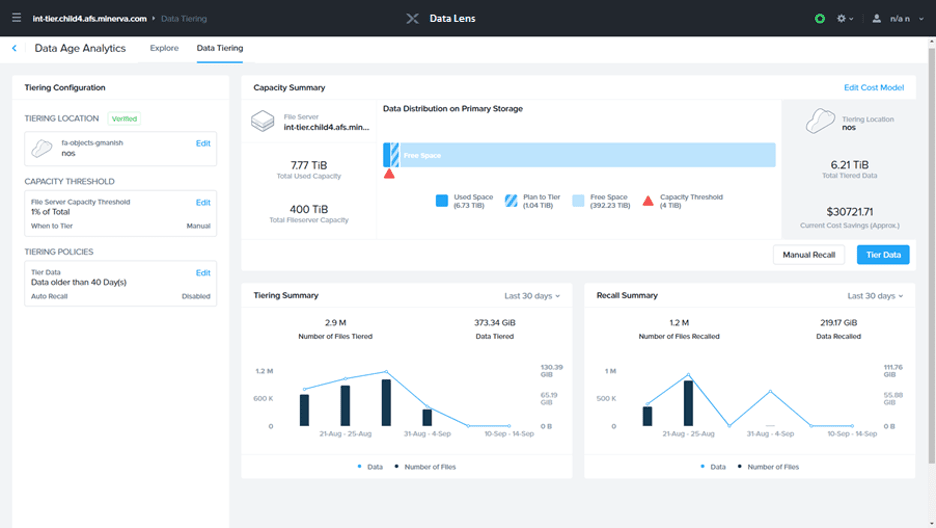
Per tutte le tipologie di erogazione, il Corsista può accedere alle attrezzature e ai sistemi presenti nei Nostri laboratori o direttamente presso i data center del Vendor o dei suoi provider autorizzati in modalità remota. Ogni partecipante dispone di un accesso per implementare le varie configurazioni avendo così un riscontro pratico e immediato della teoria affrontata. Ecco di seguito alcuni scenari tratti dalle attività laboratoriali:
Dettagli del corso
Prerequisiti
- Si consiglia la partecipazione al Corso Nutanix Hybrid Cloud Fundamentals (NHCF)
Durata del corso
- Durata Intensiva 4gg;
Frequenza
Varie tipologie di Frequenza Estensiva ed Intensiva.
Date del corso
- Corso Nutanix Enterprise Cloud Administration (ECA) (Formula Intensiva) – 11/05/2026 – 09:00 – 17:00 (TD SYNNEX)
- Corso Nutanix Enterprise Cloud Administration (ECA) (Formula Intensiva) – 21/07/2026 – 09:00 – 17:00 (TD SYNNEX)
Modalità di iscrizione
Le iscrizioni sono a numero chiuso per garantire ai tutti i partecipanti un servizio eccellente.
L’iscrizione avviene richiedendo di essere contattati dal seguente Link, o contattando la sede al numero verde 800-177596 o inviando una richiesta all’email [email protected].