
Obiettivi | Certificazione | Contenuti | Tipologia | Prerequisiti | Durata e Frequenza | Docenti | Modalità di Iscrizione | Calendario
Il Corso VMware Cloud Foundation: Automate and Operate fornisce ai partecipanti le competenze necessarie per automatizzare e gestire un ambiente private cloud VMware Cloud Foundation (VCF) utilizzando VMware Cloud Foundation Automation e VMware Cloud Foundation Operations. Attraverso un percorso tecnico di cinque giornate, i partecipanti acquisiranno conoscenze pratiche sull’architettura di VCF Automation, la gestione di provider e organizzazioni, il networking a livello provider e organization, e la configurazione di content library e cataloghi. Il corso approfondisce la creazione di blueprint, l’automazione tramite orchestrator, la gestione di ambienti Kubernetes-based IaaS e il deployment di workload tramite portali Catalog e IaaS. La seconda parte del corso si concentra su VMware Cloud Foundation Operations, con focus su architettura, health monitoring e ottimizzazione delle prestazioni. I partecipanti impareranno a creare dashboard, views, reports e alert personalizzati, gestendo metriche e policy operative in ambienti multi-tenant. Saranno trattati anche temi avanzati come la gestione dei log, il monitoraggio dello storage e della rete, il troubleshooting con VCF Health and Diagnostics, e l’integrazione con service discovery e application monitoring per il controllo centralizzato delle infrastrutture. Durante le attività pratiche vengono utilizzate tecnologie chiave come VMware NSX, vSphere, VCF Operations for Logs, VCF Storage Operations, VCF Network Operations, Supervisor, vCenter, YAML Infrastructure-as-Code, e Identity Broker. Tutte le esercitazioni sono orientate a fornire esperienza reale nella gestione di cloud automatizzati, con approccio enterprise-ready e scalabile. Il corso contribuisce alla preparazione dell’esame di Certificazione VMware Certified Professional – VMware Cloud Foundation Administrator (VCP‑VCF Admin).
Contattaci ora per ricevere tutti i dettagli e per richiedere, senza alcun impegno, di parlare direttamente con uno dei nostri Docenti (Clicca qui)
oppure chiamaci subito al nostro Numero Verde (800-177596).
Calling from abroad? Reach us at +39 02 87168254.
Obiettivi del corso
Di seguito una sintesi degli obiettivi principali del Corso VMware Cloud Foundation: Automate and Operate:
- Automatizzare la gestione di provider, organization e content library con VCF Automation
- Implementare e gestire networking multi-tenant con VMware NSX e VPC
- Creare blueprint, cataloghi e orchestrator workflow per ambienti IaaS e Kubernetes
- Analizzare e ottimizzare prestazioni con VCF Operations, dashboard e alert custom
- Monitorare infrastrutture e applicazioni tramite VCF Health, Logs e Service Discovery
Certificazione del corso
Esame VMware Certified Professional – VMware Cloud Foundation Administrator (VCP‑VCF Admin). Questo esame valuta la capacità del candidato di installare, configurare, gestire e risolvere problematiche operative all’interno di un ambiente VMware Cloud Foundation (VCF). L’esaminato deve dimostrare una solida comprensione dei principi architetturali del Software-Defined Data Center (SDDC) e dei principali componenti della piattaforma, tra cui vCenter, ESXi, vSAN, NSX, Identity Broker, VCF Automation e VCF Operations. L’obiettivo è verificare la padronanza delle funzioni fondamentali di VMware Cloud Foundation, inclusa la gestione dei domini di workload, dei cluster vSphere, della rete, dello storage e della sicurezza. Il candidato deve saper operare nelle attività quotidiane di amministrazione, gestendo ciclo di vita, certificati, licenze, password policy e processi di importazione di vCenter preesistenti, oltre alla definizione di ruoli e permessi (RBAC). L’esame approfondisce anche la capacità di troubleshooting e ottimizzazione, valutando l’efficacia del candidato nell’analizzare log, risolvere problemi di performance o rete e mantenere l’efficienza operativa dell’infrastruttura. È richiesta familiarità con gli strumenti di monitoraggio e automazione integrati nella soluzione. In sintesi, l’esame certifica competenze tecniche e operative avanzate nella gestione di VMware Cloud Foundation 9.0, attestando la capacità del candidato di mantenere un ambiente cloud stabile, sicuro e performante, in linea con gli standard Broadcom per la gestione del private e hybrid cloud.
Contenuti del corso
VCF Automation Overview and Architecture
- Describe the features, benefits, and purposes of VCF Automation
- Explain the architecture of VCF Automation
Provider Infrastructure Management
- Describe the provider management and provider consumption portals
- List the supported options for provider administrator from the provider portal
- Explain managing tasks and events from the provider portal
- Describe the features of the provider consumption organization
- Describe how to discover infrastructure resources
- Explain how to manage IP spaces and provider gateways
Provider Identity Management
- Explain how to enable VCF SSO for the Automation appliance
- Discuss configuring VMware Cloud Foundation® Identity Broker as the identity provider
- List the supported IdP (ODIC, SAML, LDAP)
- Discuss how to register a provider-scoped identity provider
- Explain managing VCF Automation roles and rights
- Discuss managing VCF Automation users and groups
- Discuss provider-scoped service accounts
Regions
- Explain the basics of a Region
- Identify the utilization of the Region
- Discuss prerequisites and available options for creating a Region
Organizations
- Describe the different Organizations offered in VCF Automation
- Identify the use cases for manual setup and multitenancy
- Identify use cases for Quick Setup
- Create a VCF Automation VM Apps Organization
- Create a VCF Automation All Apps Organization
Provider Networking
- Discuss prerequisites for creating the provider network
- Discuss the workflow for configuring the provider network
- Describe IP Spaces
- Discuss Edge nodes, Edge clusters, and the network services it offers
- Configure IP Spaces and verify the configuration
- Configure the Provider Gateway and verify the status
- Synchronize Edge clusters and verify the status
- Configure regional networking for an Organization
- Discuss steps to verify the creation of network resources in VMware NSX®, VMware vCenter®, and VCF Automation.
- Discuss the mapping of resources between VCF Automation, NSX, and vCenter
Organization Networking with VPC
- Discuss Organization Networking
- Discuss the architecture of the VPC
- Discuss access modes and subnet types in VPC
- Describe the scope of different subnet types in VPC
- Discuss Outbound Routing and Network Address Translations in VPC
- Configure VPC with a default, custom connectivity profile and verify its status
- Configure Private-TGW IP Block, associate it with a VPC, and verify its status
Provider Content Library
- Describe the Provider Content Library creation workflow
- Explain publishing and subscribing to a Content Library
Organization Management
- Identify the key components of an All Apps Organization
- Explain namespace classes
- Explain creating and managing Projects
- Discuss Chargeback for Organizations
- Integrate identity providers into Organizations
- Manage users and groups in an Organization
- Create and manage deployment-centric policies
- Create and manage Supervisor resource-centric policies
Organization Content Management
- Identify and manage the different content available in Content Hub
- Differentiate between catalog self-service versus IaaS self-service
- Publish content to Catalog for end-user consumption
- Deploy and modify Catalog items
- Configure and use custom forms
- Explain the role of YAML in configuring and managing infrastructure as code
- Publish Content to Catalog for End User Consumption
- Discuss the use of the embedded orchestrator
- Discuss the use cases of an external orchestrator
- Describe orchestrator workflows
IaaS Platform Architecture and Deployment
- Explain Supervisor architecture
- Discuss Supervisor requirements
- List Supervisor use cases
- Discuss the vSphere administrator workflow
- List the components of the Supervisor
- Discuss the types of Supervisor deployment
- Discuss the requirements of Supervisor deployment
- Describe Supervisor deployment during the VI Workload Domain creation
Deploying Modern Apps with IaaS
- Discuss self-service consumption with IaaS services in VCF 9
- Discuss the features of the IaaS console
- Describe how to get instance information from the console
- Explain the YAML Spec for the VM service
- Discuss VCF CLI commands
VCF Operations Overview
- List the key features of VCF Operations
- Outline VCF Operations use cases
- Navigate the VCF Operations console
- Identify the components of a VCF Operations node
- Describe the different roles of the node in a VCF Operations cluster
VCF Metrics, Views, and Reports
- Outline the role of metrics in VCF Operations
- Outline the role of views in VCF Operations
- List the steps to create a basic custom view and configure view settings
- Outline the roles of reports in VCF Operations
- List the steps to create a basic report and configure report settings
VCF Dashboards
- Describe the functions of dashboards
- Create dashboards that use predefined and custom widgets
- Manage dashboards by grouping and sharing with users
- Explain the use cases of predefined dashboards and custom dashboards
- List VCF Operations use cases
VCF Symptoms and Alerts
- Describe the purpose of using alerts
- Identify the components of an alert definition
- Create symptom definitions
- View and manage triggered alerts in the VCF Operations console
- Configure a custom alert using the Create Alert Definition workflow
VCF Health and Diagnostics
- Outline the role of VCF Health and Diagnostics
- Describe the VCF Health and Diagnostic Findings features
- Monitor the operational state of VCF instances
- Explain Troubleshooting Workbench
- Enable support teams with full context using Log Assist
VCF Logs, Storage, and Network Operations
- Describe the VCF Operations for logs overview
- Describe the key benefits of the VCF Operations for logs
- Describe the capabilities of VCF Operations for logs
- Describe the VCF Storage Operations overview
- Identify performance and health issues with the Storage clusters
- Describe the benchmarking and optimization tool to detect issues for a new cluster
- Describe the VCF Network Operations overview
- Discuss the different widgets available in VCF Network Operations
- Identify the performance and health issues with the VCF Network object
VCF Operations Policies
- Describe the purposes of policies in VCF Operations
- Configure policies and other components
VCF Centralized Monitoring
- Describe the infrastructure services monitoring capabilities
- Describe the application monitoring capabilities
- Describe the different types of application metrics
- Outline the requirements to enable service discovery and application monitoring
- Describe the different types of service metrics
- Use collected metrics to interpret the status of services
Tipologia
Corso di Formazione con Docente
Docenti
I docenti sono Istruttori Autorizzati VMware e in altre tecnologie IT, con anni di esperienza pratica nel settore e nella Formazione.
Infrastruttura laboratoriale
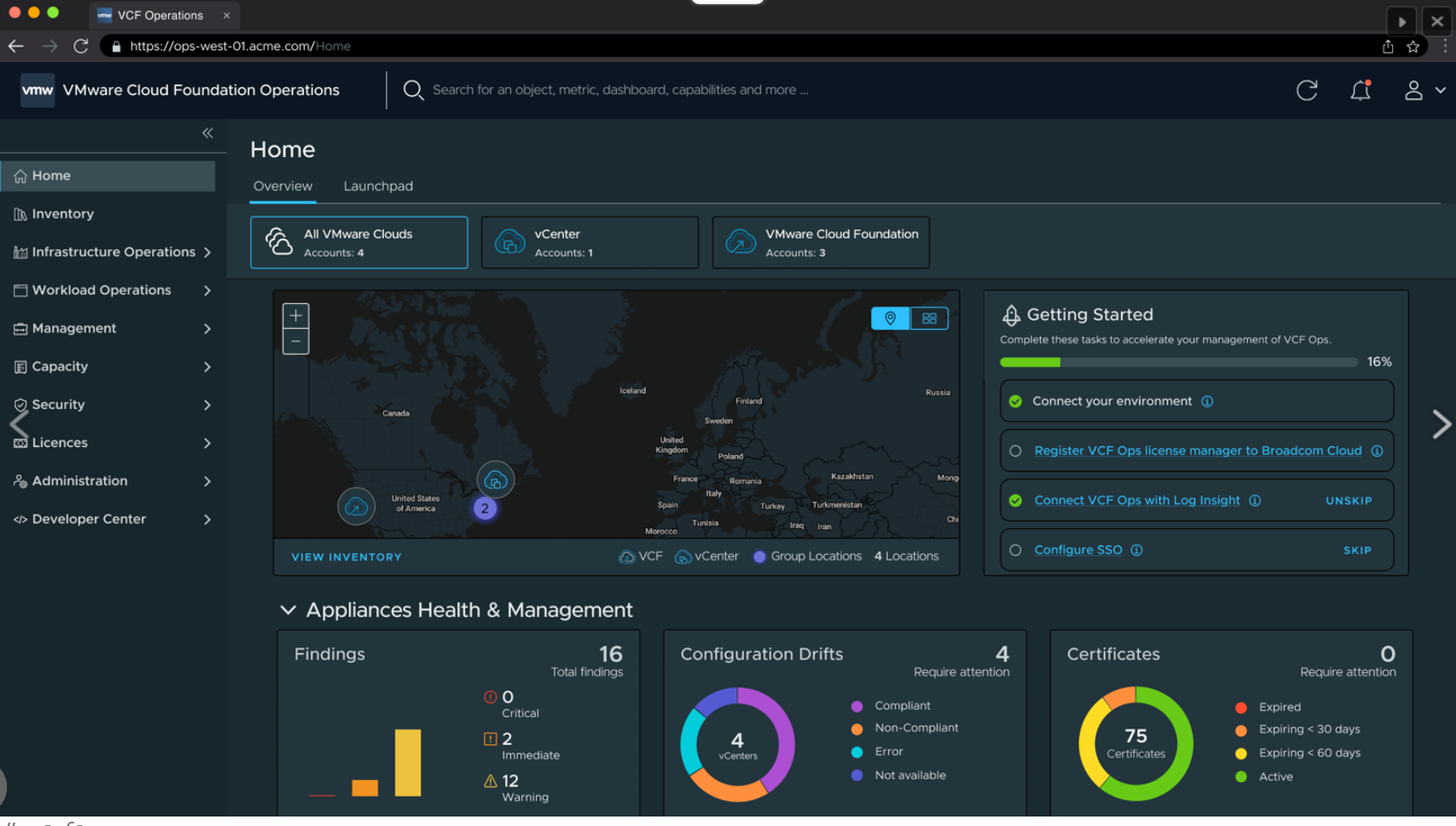
Per tutte le tipologie di erogazione, il Corsista può accedere alle attrezzature e ai sistemi presenti nei Nostri laboratori o direttamente presso i data center del Vendor o dei suoi provider autorizzati in modalità remota. Ogni partecipante dispone di un accesso per implementare le varie configurazioni avendo così un riscontro pratico e immediato della teoria affrontata. Ecco di seguito alcuni scenari tratti dalle attività laboratoriali:
Dettagli del corso
Prerequisiti
- Si consiglia la partecipazione al Corso VMware vSphere: Install, Configure, Manage e il Corso VMware NSX: Install, Configure, Manage
Durata del corso
- Durata Intensiva 5gg;
Frequenza
Varie tipologie di Frequenza Estensiva ed Intensiva.
Date del corso
- Corso VMware Cloud Foundation: Automate and Operate (Formula Intensiva) – 18/05/2026 – 09:00 – 17:00 (TD SYNNEX)
Modalità di iscrizione
Le iscrizioni sono a numero chiuso per garantire ai tutti i partecipanti un servizio eccellente.
L’iscrizione avviene richiedendo di essere contattati dal seguente Link, o contattando la sede al numero verde 800-177596 o inviando una richiesta all’email [email protected].