
Obiettivi | Certificazione | Contenuti | Tipologia | Prerequisiti | Durata e Frequenza | Docenti | Modalità di Iscrizione | Calendario
Il Corso VMware Cloud Foundation: Build, Manage, and Secure fornisce ai partecipanti le competenze necessarie per implementare, gestire, operare e mettere in sicurezza un’infrastruttura private cloud basata su VMware Cloud Foundation (VCF). Attraverso un approccio tecnico e pratico, vengono approfonditi i concetti architetturali di VCF, la gestione dello storage e del networking, le procedure di deployment e post-deployment, il controllo dei domini di workload e il ciclo di vita dell’ambiente cloud. Particolare attenzione è rivolta ai moduli di fleet management, alla gestione dei certificati e alla sicurezza multilivello. Durante il percorso formativo, i partecipanti apprendono come utilizzare gli strumenti di gestione integrata come VMware vCenter, VMware NSX, vSAN, VCF Operations for Networks, VCF Operations for Logs e VCF Identity Broker. Vengono illustrate le modalità di configurazione e amministrazione dei domini, la gestione dei permessi e delle identità, e l’implementazione di ambienti ibridi sicuri e resilienti. Le esercitazioni pratiche includono la configurazione di Fibre Channel, iSCSI e NFS Storage, la validazione di un cluster vSAN e l’integrazione con Public Key Infrastructure (PKI) per la gestione dei certificati. Il corso affronta inoltre le logiche di life cycle management, con focus sulle operazioni di aggiornamento e patching delle componenti VCF e sulla compatibilità delle versioni, fino agli scenari di upgrade verso VCF 9.0. Una sezione è dedicata alla sicurezza, conformità e resilienza del cloud, includendo benchmark di compliance e monitoraggio della configurazione. Le tecnologie trattate comprendono VMware Cloud Foundation, vSphere, vCenter, vSAN, NSX, Aria Operations, Identity Broker e OpenSSL CA. Il corso contribuisce alla preparazione dell’esame di Certificazione VMware Certified Professional – VMware Cloud Foundation Administrator (VCP‑VCF Admin).
Contattaci ora per ricevere tutti i dettagli e per richiedere, senza alcun impegno, di parlare direttamente con uno dei nostri Docenti (Clicca qui)
oppure chiamaci subito al nostro Numero Verde (800-177596).
Calling from abroad? Reach us at +39 02 87168254.
Obiettivi del corso
Di seguito una sintesi degli obiettivi principali del Corso VMware Cloud Foundation: Build, Manage, and Secure:
- Implementare e configurare un’infrastruttura VMware Cloud Foundation end-to-end
- Gestire networking, storage e workload domain con VMware NSX e vSAN
- Automatizzare deployment e gestione tramite VCF Operations e Fleet Management
- Integrare sicurezza e gestione certificati in ambienti multi-tenant
- Applicare strategie di life cycle management e upgrade fino a VCF 9.0
Certificazione del corso
Esame VMware Certified Professional – VMware Cloud Foundation Administrator (VCP‑VCF Admin). Questo esame valuta la capacità del candidato di installare, configurare, gestire e risolvere problematiche operative all’interno di un ambiente VMware Cloud Foundation (VCF). L’esaminato deve dimostrare una solida comprensione dei principi architetturali del Software-Defined Data Center (SDDC) e dei principali componenti della piattaforma, tra cui vCenter, ESXi, vSAN, NSX, Identity Broker, VCF Automation e VCF Operations. L’obiettivo è verificare la padronanza delle funzioni fondamentali di VMware Cloud Foundation, inclusa la gestione dei domini di workload, dei cluster vSphere, della rete, dello storage e della sicurezza. Il candidato deve saper operare nelle attività quotidiane di amministrazione, gestendo ciclo di vita, certificati, licenze, password policy e processi di importazione di vCenter preesistenti, oltre alla definizione di ruoli e permessi (RBAC). L’esame approfondisce anche la capacità di troubleshooting e ottimizzazione, valutando l’efficacia del candidato nell’analizzare log, risolvere problemi di performance o rete e mantenere l’efficienza operativa dell’infrastruttura. È richiesta familiarità con gli strumenti di monitoraggio e automazione integrati nella soluzione. In sintesi, l’esame certifica competenze tecniche e operative avanzate nella gestione di VMware Cloud Foundation 9.0, attestando la capacità del candidato di mantenere un ambiente cloud stabile, sicuro e performante, in linea con gli standard Broadcom per la gestione del private e hybrid cloud.
Contenuti del corso
Course Introduction
- Introduction and course logistics
- Course objectives
VCF Private Cloud: Overview and Architecture
- Define VCF and its key features
- Describe the use cases of VCF
- Explain the capabilities of VCF
- Describe the integrated security across all layers in VCF
- Explain the advanced services of VCF
- Explain the architecture of the VCF private cloud
- Recognize the components of the VCF private cloud
- Distinguish between VCF fleet-level components and VCF instance-level components
- Describe the various roles in VCF private cloud
VCF Private Cloud Deployment
- Identify the VCF fleet deployment considerations
- Describe the process for planning and preparing a VCF deployment
- Identify the information required for the Planning and Preparation Workbook
- Explain the high-level steps to deploy VCF private cloud
- Outline the sequence for deploying the VCF private cloud
- Describe the deployment configuration of VCF instance core components
- Explain the deployment configuration of VCF fleet management components
- Use the VCF Installer deployment wizard to deploy a new VCF fleet
- Use a deployment specification JSON file to deploy a new VCF fleet
VCF Post-deployment Tasks
- Navigate the VCF Operations user interface
- Navigate the VMware Cloud Foundation® Automation user interface
- Navigate the vSphere Client user interface
- Explain VCF Operations for networks, VCF Operations for logs, and VCF Identity Broker
- Deploy VCF Operations for networks, VCF Operations for logs, and VCF Identity Broker
VCF Fleet Management
- Describe the VCF licensing model
- Assign and manage VCF licenses
- Identify key log files to troubleshoot licensing issues
- Discuss single sign-on in VCF
- Describe the single sign-on architecture in VCF
- Discuss VCF Identity Broker in VCF
- Identify the steps to configure single sign-on in VCF
- List the supported directories and IDPs in VCF
- Configure SSO and enablement for all components in a VCF Instance
- Manage users and user groups in VCF
- Outline the steps to manage passwords
VCF Workload Domain
- Explain VCF domains
- Describe the management of the workload domains
- List design considerations for workload domains
- Describe design prerequisites for a workload domain
- Outline the steps to create a workload domain
- Describe vCenter Groups
- Configure vCenter linked groups
- Import vCenter as a workload domain using VCF Operations
VCF Networking
- Describe the role of VMware NSX in VCF
- Describe the default NSX objects that are created during the VCF deployment
- Discuss the Workload domain networking options
- Describe the networking constructs in NSX
- Explain Virtual Private Cloud concepts and constructs
- Differentiate between Centralized and Distributed Network Connectivity
- Configure Distributed Network Connectivity
- Configure Centralized Network Connectivity
- Identify key CLI commands to determine the NSX Edge cluster status and BGP peering
- Create a Virtual Private Cloud
- Create subnets within a virtual private cloud
VCF Storage Management
- Define the key components involved in Fibre Channel storage systems
- Describe the process for configuring Fibre Channel storage
- Identify the components of an iSCSI storage system
- Explain how iSCSI addressing works
- Describe the benefits and considerations of using multipathing with iSCSI storage
- List the requirements to use NFS as principal and supplemental storage
- Outline the process of provisioning NFS storage to ESX hosts
- Describe the steps involved in deploying a vSAN cluster
- Identify and use built-in tools to validate a successful vSAN deployment
- Apply a custom storage policy to an individual virtual machine or virtual disk
- Compare the various tools used to monitor a vSAN cluster
- Explain the types of vSAN reports available in VCF Operations
- Compare different maintenance mode options and their impact on object health
- Summarize the steps to power down a vSAN cluster in a workload domain
VCF Certificate Management
- Describe public key infrastructure
- Explain the purpose of certificate signing requests
- Outline the steps to integrate certificates in VCF
- List the available CA options in SDDC Manager
- Integrate VCF Operations with Microsoft CA and OpenSSL CA
- Manage certificates in VCF
VCF Life Cycle Management
- Discuss life cycle management in VCF
- Explain the life cycle management of VCF fleet management
- Describe how to configure software depots
- Describe how to upgrade and patch fleet management components
- Explain the life cycle management of VCF components
- Describe how to upgrade and patch the VCF management components
- Explain the process for backing up and restoring fleet-level management components
- Explain the process for backing up and restoring VCF management components
VCF Security
- Define security, compliance and resilience in VCF
- Describe the integrated security features across all layers in VCF
- Explain the advanced networking and security capabilities of VCF
- Outline the steps to monitor User and Infrastructure Security
- Explain how Compliance Benchmark works
- Outline the steps to monitor Configuration Drift
VCF Upgrade Paths
- Identify the supported upgrade paths to VCF 9.0
- Explain the upgrade key consideration
- Evaluate both existing and future compatibility assessments
- Explain the upgrade sequence to the VCF 9 fleet using the existing vSphere
- Explain the upgrade sequence to the VCF 9 fleet using the existing vSphere and VCF Operations
- Explain the upgrade sequence to the VCF 9 fleet using the existing VCF 5.2 with multiple Aria components
Tipologia
Corso di Formazione con Docente
Docenti
I docenti sono Istruttori Autorizzati VMware e in altre tecnologie IT, con anni di esperienza pratica nel settore e nella Formazione.
Infrastruttura laboratoriale
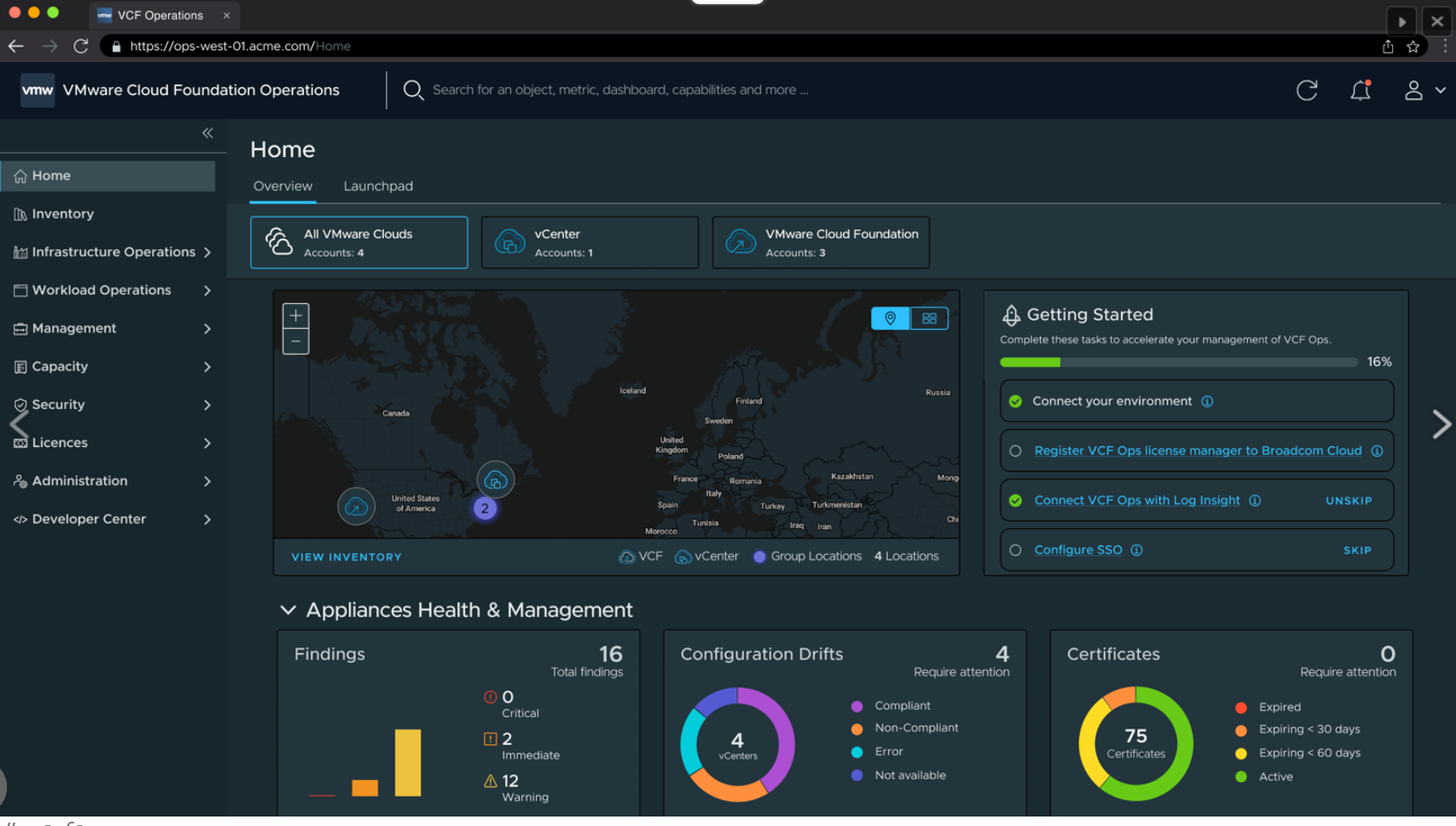
Per tutte le tipologie di erogazione, il Corsista può accedere alle attrezzature e ai sistemi presenti nei Nostri laboratori o direttamente presso i data center del Vendor o dei suoi provider autorizzati in modalità remota. Ogni partecipante dispone di un accesso per implementare le varie configurazioni avendo così un riscontro pratico e immediato della teoria affrontata. Ecco di seguito alcuni scenari tratti dalle attività laboratoriali:
Dettagli del corso
Prerequisiti
- Si consiglia la partecipazione al Corso VMware vSphere: Install, Configure, Manage e il Corso VMware NSX: Install, Configure, Manage
Durata del corso
- Durata Intensiva 5gg;
Frequenza
Varie tipologie di Frequenza Estensiva ed Intensiva.
Date del corso
- Corso VMware Cloud Foundation: Build, Manage, and Secure (Formula Intensiva) – 02/02/2026 – 09:00 – 17:00 (TD SYNNEX)
Modalità di iscrizione
Le iscrizioni sono a numero chiuso per garantire ai tutti i partecipanti un servizio eccellente.
L’iscrizione avviene richiedendo di essere contattati dal seguente Link, o contattando la sede al numero verde 800-177596 o inviando una richiesta all’email [email protected].