
Obiettivi | Certificazione | Contenuti | Tipologia | Prerequisiti | Durata e Frequenza | Docenti | Modalità di Iscrizione | Calendario
Il Corso VMware vSphere Foundation: Build, Manage, and Operate offre ai partecipanti una formazione tecnica completa sulle competenze necessarie per distribuire, configurare e gestire ambienti VMware vSphere Foundation. Durante le cinque giornate di formazione intensiva, i partecipanti acquisiranno padronanza nell’amministrazione di un’infrastruttura vSphere che include VCF Operations 9.0, vCenter 9.0 e ESX 9.0, approfondendo l’architettura, le componenti e le funzionalità avanzate della piattaforma. Il corso guida i partecipanti attraverso le fasi di installazione e configurazione di ESXi, la creazione di reti virtuali basate su vSphere Standard Switch e vSphere Distributed Switch, la gestione di datastore e l’utilizzo delle principali tecnologie di storage come Fibre Channel, iSCSI e NFS. Ampio spazio viene dedicato alla gestione delle macchine virtuali (VM), includendo provisioning, clonazione, snapshot, e alla creazione di content libraries per il deployment e la standardizzazione degli ambienti. Viene inoltre trattata la configurazione di cluster vSphere abilitati a vSphere High Availability (HA) e vSphere Distributed Resource Scheduler (DRS), con analisi delle policy di allocazione delle risorse e delle strategie di failover. I partecipanti impareranno a gestire ambienti vSAN comprendendo le differenze tra OSA ed ESA, la gestione dei componenti e la valutazione delle performance. La formazione copre anche l’integrazione con vSphere Kubernetes Service, illustrando l’architettura del Supervisor Service, la gestione dei namespace e dei cluster Kubernetes, oltre all’uso di VCF Operations per metriche, dashboard e alert personalizzati. Infine, viene affrontato il lifecycle management di vSphere Foundation, comprendendo gli strumenti come vCenter Update Planner e vSphere Lifecycle Manager per l’aggiornamento e la manutenzione delle componenti. Il corso contribuisce alla preparazione dell’esame di Certificazione VMware Certified Professional – VMware vSphere Foundation Administrator (VCP‑VVF Admin).
Contattaci ora per ricevere tutti i dettagli e per richiedere, senza alcun impegno, di parlare direttamente con uno dei nostri Docenti (Clicca qui)
oppure chiamaci subito al nostro Numero Verde (800-177596).
Calling from abroad? Reach us at +39 02 87168254.
Obiettivi del corso
Di seguito una sintesi degli obiettivi principali del corso VMware vSphere Foundation: Build, Manage, and Operate:
- Implementare, configurare e amministrare infrastrutture basate su VMware vSphere Foundation
- Gestire networking e storage virtuali attraverso vSphere Standard e Distributed Switches, iSCSI, NFS e vSAN
- Automatizzare e ottimizzare la gestione delle VM tramite vMotion, Storage vMotion e template
- Integrare e gestire cluster vSphere abilitati a HA, DRS e Kubernetes Services
- Monitorare e mantenere la piattaforma con VCF Operations, Lifecycle Manager e Update Planner
Certificazione del corso
Esame VMware Certified Professional – VMware vSphere Foundation Administrator (VCP‑VVF Admin). Questo esame attesta le competenze del candidato nella gestione e amministrazione di ambienti VMware vSphere Foundation (VVF), parte integrante dell’ecosistema VMware vSphere Foundation. L’esame valuta la capacità di implementare, configurare e mantenere un’infrastruttura virtuale completa che supporta workload basati su macchine virtuali e su Supervisor, ponendo particolare attenzione agli aspetti di automazione, sicurezza e ottimizzazione operativa. Il candidato deve dimostrare di saper applicare i principi di virtualization, comprendendo le architetture e i casi d’uso di VMware vSphere, vCenter, ESXi e vSAN. I topic testati includono la configurazione dei compute components (vCenter ed ESXi), la creazione e gestione dei cluster con funzionalità vSphere DRS e vSphere HA, la definizione delle politiche di storage con vSAN ESA/OSA e la gestione della networking layer tramite standard e distributed switch. L’esaminato è inoltre valutato sulla capacità di amministrare l’ambiente VVF attraverso il lifecycle management, la gestione delle licenze, dei certificati e dei ruoli (RBAC), oltre alla configurazione dell’integrazione con VCF Operations e VCF Operations for Logs. L’esame copre anche la supervisione delle metriche, il monitoraggio delle performance, l’analisi dei log, la creazione di dashboard e alert, e la definizione di custom policies per il controllo delle risorse e della compliance di sicurezza. Infine, vengono testate le competenze nella deployment automation, inclusa la capacità di distribuire VM Services, Kubernetes workloads, vSphere Pods e servizi basati su Supervisor, dimostrando padronanza nella gestione di ambienti ibridi e containerizzati.
Contenuti del corso
Course Introduction
- Introduction and course logistics
- Course objectives
VMware vSphere Foundation Overview and Architecture
- Define the vSphere Foundation key features
- Explain vSphere Foundation use cases
- Explain the architecture of vSphere Foundation
- Explore the components of vSphere Foundation
- Introduction to VCF Operations
- List the steps to navigate the VCF Operations UI and vSphere UI
License Management
- Describe the process for managing and assigning licenses
- Enable VCF Operations integration for vCenter
- Explain license usage by product
vSphere Foundation Compute
- Explain basic virtualization concepts
- Describe how vSphere fits in the software-defined data center
- Describe vSphere architecture and use cases
- Recognize the user interfaces for accessing vSphere
- Install and configure ESXi host
- Create and organize vCenter inventory objects
vSphere Foundation Networking
- Create and configure standard switch
- Create and configure distributed switch
- Differentiate between standard and distributed switches
- Explain how to set networking policies
vSphere Foundation Storage
- Recognize vSphere storage technologies
- Identify the types of vSphere datastores
- Describe Fibre Channel components and addressing
- Describe iSCSI components and addressing
- Configure iSCSI storage on ESXi
- Create and manage VMFS datastores
- Configure and manage NFS datastores
Deploying Virtual Machines
- Create and provision VMs
- Explain the importance of VMware Tools
- Manage a virtual machine from the vSphere client
- Manage virtual machine resources
- List the steps to deploy virtual machines
- Clone VMs and create customization specifications for guest operating systems
- Create local, published, and subscribed content libraries
Virtual Machine Management
- Migrate VMs using vSphere vMotion and Storage vMotion
- Perform snapshot operations
- Specify CPU and memory shares, reservations, and limits
Deploying and Configuring vSphere Clusters
- Create a vSphere cluster enabled for vSphere DRS and vSphere HA
- Explain how vSphere DRS determines VM placement on hosts in the cluster
- Recognize use cases for vSphere DRS settings
- Describe how vSphere HA responds to various types of failures
- Identify options for configuring network redundancy in a vSphere HA cluster
- Recognize vSphere HA design considerations
- Recognize the use cases for various vSphere HA settings
- Configure a vSphere HA cluster
vSAN Management
- Identify the features of vSAN
- Understand the key differences between vSAN OSA and vSAN ESA
- Explain the role of the performance leg and the capacity leg in vSAN ESA
- Examine vSAN ESA Object health states
- Compare how RAID-0/1/5/6 space consumption
- Identify vSAN component states
vSphere Kubernetes Service Overview
- Describe vSphere Supervisor Architecture and use cases
- Explain vSphere Supervisor Deployment Options
- Install vSphere Supervisor
- Explain Supervisor Storage vSphere Zones, Networking, and Storage
- Configure and manage a Supervisor
- Configure vSphere Namespaces for hosting VKS Clusters
- Manage vSphere Kubernetes Service Clusters
VCF Operations Metrics
- Outline the role of metrics in VCF Operations
- Create and configure views in VCF Operations
- Create and configure reports in VCF Operations
- Create and configure dashboards in VCF Operations
- Configure widget interactions
- Describe the purpose of using alerts
- Identify the components of an alert definition
- Create static symptom definitions
vSphere Foundation Deployment
- Prepare the infrastructure for VMware vSphere Foundation
- Identify the information required for the Planning and Preparation Workbook
- Explain the high-level steps to deploy vSphere Foundation
- Describe the procedure for downloading the software using online and offline modes
- Describe the vSphere Foundation workflow using the VCF Installer UI and JSON spec file
- Deploy and enable VCF Operations Collector, VCF Operations for Logs, and VCF Operations Orchestrator
- Deploy vCenter Server Appliance
Managing the vSphere Foundation Lifecycle
- Describe features of the vCenter Update Planner
- Run vCenter upgrade prechecks and interoperability reports
- Recognize features of VMware vSphere Lifecycle Manager
- Validate and update ESXi hosts using vSphere Lifecycle Manager
- Use vSphere Lifecycle Manager to upgrade VMware Tools and VM hardware
Tipologia
Corso di Formazione con Docente
Docenti
I docenti sono Istruttori Autorizzati VMware e in altre tecnologie IT, con anni di esperienza pratica nel settore e nella Formazione.
Infrastruttura laboratoriale
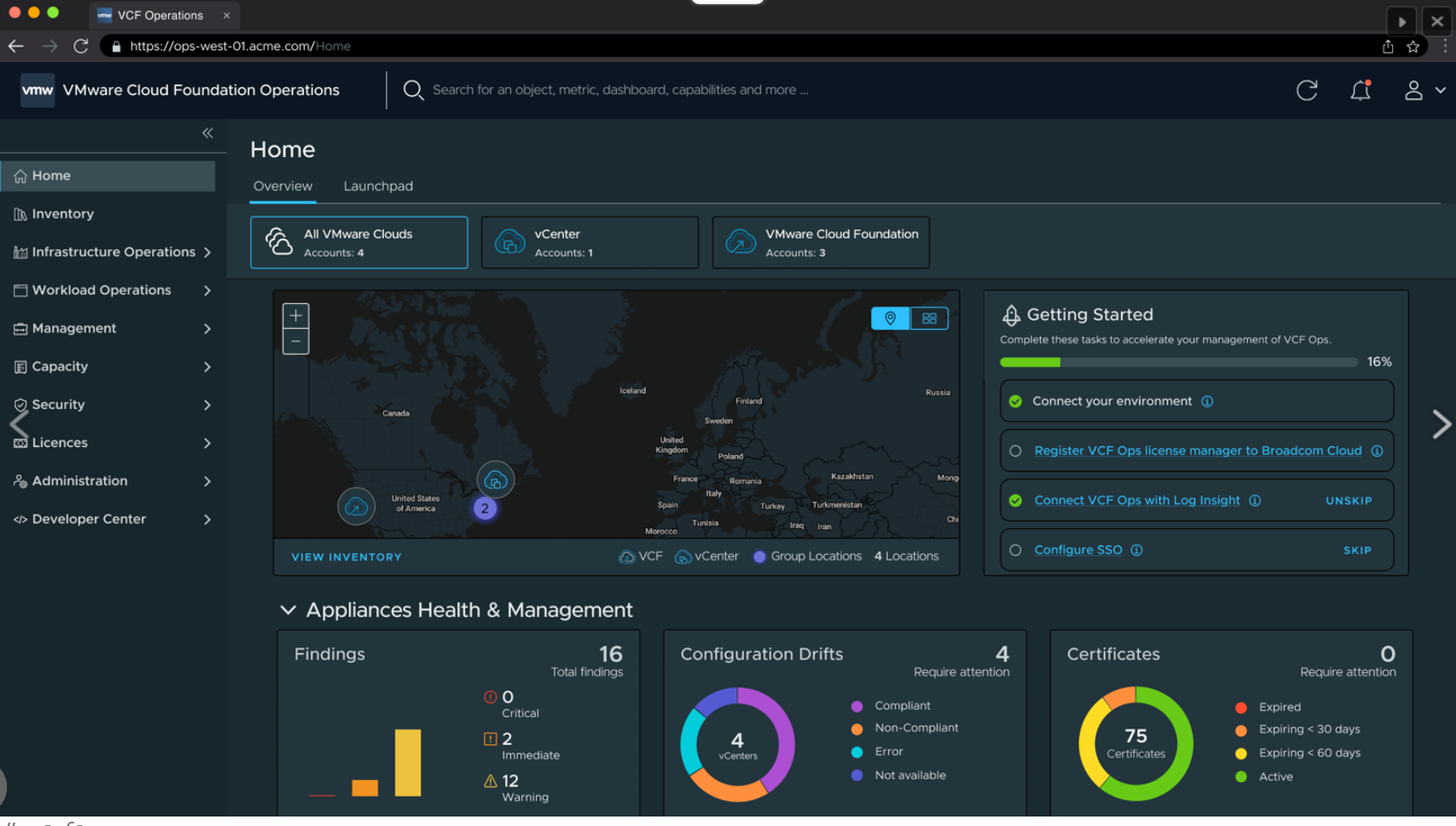
Per tutte le tipologie di erogazione, il Corsista può accedere alle attrezzature e ai sistemi presenti nei Nostri laboratori o direttamente presso i data center del Vendor o dei suoi provider autorizzati in modalità remota. Ogni partecipante dispone di un accesso per implementare le varie configurazioni avendo così un riscontro pratico e immediato della teoria affrontata. Ecco di seguito alcuni scenari tratti dalle attività laboratoriali:
Dettagli del corso
Prerequisiti
- Basi di Virtualizzazione e Networking.
Durata del corso
- Durata Intensiva 5gg;
Frequenza
Varie tipologie di Frequenza Estensiva ed Intensiva.
Date del corso
- Corso VMware vSphere Foundation: Build, Manage and Operate (Formula Intensiva) – 28/09/2026 – 09:00 – 17:00
- Corso VMware vSphere Foundation: Build, Manage and Operate (Formula Intensiva) – 14/12/2026 – 09:00 – 17:00
Modalità di iscrizione
Le iscrizioni sono a numero chiuso per garantire ai tutti i partecipanti un servizio eccellente.
L’iscrizione avviene richiedendo di essere contattati dal seguente Link, o contattando la sede al numero verde 800-177596 o inviando una richiesta all’email [email protected].