
Obiettivi | Certificazione | Contenuti | Tipologia | Prerequisiti | Durata e Frequenza | Docenti | Modalità di Iscrizione | Calendario
Il Corso VMware Cloud Director: Install, Configure, Manage [V10.6] è un programma di formazione di cinque giorni destinato a cloud architects, systems engineers, data center administrators e cloud administrators. Il corso copre l’installazione, la configurazione e la gestione di ambienti VMware Cloud Director, includendo il provisioning dei workload, la creazione di organizzazioni, VDC, servizi di catalogo e configurazioni di rete. Le tecnologie trattate comprendono data center software-defined, VMware Cloud Director deployment, configurazioni del provider, accesso basato su ruoli, macchine virtuali, vApp, librerie di contenuti, networking, servizi edge gateway, storage, computing e soluzioni integrate. Il corso contribuisce alla preparazione dell’esame di Certificazione VMware Certified Specialist Cloud Provider.
Contattaci ora per ricevere tutti i dettagli e per richiedere, senza alcun impegno, di parlare direttamente con uno dei nostri Docenti (Clicca qui)
oppure chiamaci subito al nostro Numero Verde (800-177596).
Calling from abroad? Reach us at +39 02 87168254.
Obiettivi del corso
Di seguito una sintesi degli obiettivi principali del Corso VMware Cloud Director: Install, Configure, Manage [V10.6]:
- Implementare e configurare VMware Cloud Director.
- Gestire e mantenere organizzazioni e virtual data centers.
- Configurare e gestire servizi di rete e edge gateway.
- Utilizzare content libraries e cataloghi di servizi.
- Implementare soluzioni integrate con VMware Cloud Director.
Certificazione del corso
Esame VMware Certified Specialist Cloud Provider: Questo esame verifica le competenze degli esaminati nell’implementazione e gestione di VMware Cloud Director. Gli argomenti trattati includono il deployment e la configurazione di VMware Cloud Director, la gestione delle risorse del cloud provider e l’ottimizzazione dell’infrastruttura cloud. Gli esaminati devono dimostrare competenze nell’uso di strumenti di automazione per il cloud management, nell’integrazione con VMware Cloud Foundation e nella configurazione e gestione del Cloud Provider Pod e del Cloud Provider Hub. Inoltre, sono valutate le abilità nella gestione della sicurezza e della rete all’interno degli ambienti VMware Cloud.
Contenuti del corso
Course Introduction
- Introductions and course logistics
- Course objectives
VMware Cloud Director Deployment and Configuration
- Describe VMware Cloud Director features and functions
- Describe the VMware Cloud Director architecture
- List the prerequisites for deploying VMware Cloud Director
- Recognize the design considerations when creating a cloud environment
- Describe various VMware Cloud Director deployment methods and options
- Explain the two-stage deployment of VMware Cloud Director cells
- Back up and restore a VMware Cloud Director appliance
- Describe the appliance failover methods
- Describe failover, switchover, and promote in the VMware Cloud Director appliance
- Monitor the VMware Cloud Director appliance services and cluster status
VMware Cloud Director Provider Configuration
- Describe the provider portal
- Define a provider VDC, an organization, and organization VDCs
- Configure VMware Cloud Director objects from the VMware Cloud Director provider portal as a system administrator
- Describe provider VDCs and their role in resource allocation
- Explain the configuration of resource pools and storage containers in a provider VDC
- Configure organizations and access the tenant portal
- Identify allocation models for organization VDCs
- Recognize the advantages and disadvantages of allocation models
- Describe how organization VDCs work
VMware Cloud Director User, Roles, and Quota Management
- Configure LDAP integration with Active Directory
- Enable a SAML and an OIDC identity provider
- Identify the various types of users in VMware Cloud Director
- Create and import users from the provider portal and the tenant portal
- Describe the options for managing users and groups
- Describe how role-based access control works in VMware Cloud Director
- Explain provider roles
- Recognize the function of the rights bundles
- Explain global roles and their usage in VMware Cloud Director
- Create custom tenant roles
- Explain Quota Management and its use cases
- Configure VMware Cloud Director as an OpenID Provider Proxy Server
VMware Cloud Director Virtual Machines and vApps
- Explain standalone VMs and VMs in a vApp
- Describe VM actions
- List the properties of a VM
- Create and manage VMs
- Explain vApp deployment methods
- Explain vApp actions and functions
- Describe VM encryption and how VMs and disks are encrypted
- Describe named disks and shared named disks
- Create multiple snapshots for vApps and VMs
- Describe Auto Scale Groups and their advantages
- Explain VM placement, VM sizing, and vGPU policies
- Describe NVIDIA vGPU and NVIDIA AI Enterprise
- Explain the NVIDIA GRID vGPU requirements
- Implement vGPU in VMware Cloud Director
Managing Catalogs and Templates
- Describe Content Hub and their advantages
- Create and manage VMware Marketplace Resource
- Create and manage External Helm Chart Repository Resource
- Explain the purpose and use of catalogs
- Create and manage catalogs
- Describe, how catalogs are shared between and within organizations
- Describe vApp templates and their advantages
- Create and manage the vApp template
- Create and manage the organization VDC template
VMware Cloud Director Networking
- Discuss the integration of VMware Cloud Director with VMware NSX
- Describe VMware Cloud Director networks
- Perform provider networking tasks
- Discuss organization VDC networks
- List the types of organization VDC networks
- Discuss vApp networks
- List the various types of vApp networks
- Describe the segment profile template
- Configure edge gateway services
Sub-Provider in VMware Cloud Director
- Explain the concept of Sub-Providers
- Explain the configuration of resources to a Sub Provider
- Manage a Sub-Provider organization
- Use the Sub-Provider organization to configure identity provider and manage users
- Configure quotas and policies to a Sub-Provider
- Perform common catalog tasks in the Sub-Provider organization
- Perform common networking tasks in the Sub Provider organization
VMware Avi Load Balancer
- Discuss VMware Cloud Director integration with VMware NSX Advanced Load Balancer
- Describe NSX Advanced Load Balancer components
- Configure NSX Advanced Load Balancer in the provider portal
- Configure NSX Advanced Load Balancer in the tenant portal
Edge Data Center Group Networking
- Describe Data Center Group network
- Create Data Center Group
- Add a NSX Edge gateway to a Data Center Group
- Activate Distributed Firewall for a Data Center Group
- Configure Data Center Groups using NSX Federation
Additional Features of VMware Cloud Director
- Explain the purpose and features of advisories
- Describe the Guided Tour feature and its use cases
- Configure VMware Cloud Director branding
- Explain the Solution Add-Ons feature in VMware Cloud Director
- Briefly discuss VMware Cloud Director integration with the following solutions:
- VMware Cloud Director Availability
- VMware Cloud Director App Launchpad
- VMware Cloud Director Container Service Extension
- VMware Cloud Director Object Storage Extension
- VMware vCloud Usage Meter
- VMware Aria Operations for Logs
- VMware Aria Operations
- VMware Chargeback
- VMware Aria Automation
- VMware Cloud Director Extension for Data Solutions
- VMware Cloud Provider Lifecycle Manager
- VMware Workspace ONE
Tipologia
Corso di Formazione con Docente
Docenti
I docenti sono Istruttori Autorizzati VMware e in altre tecnologie IT, con anni di esperienza pratica nel settore e nella Formazione.
Infrastruttura laboratoriale
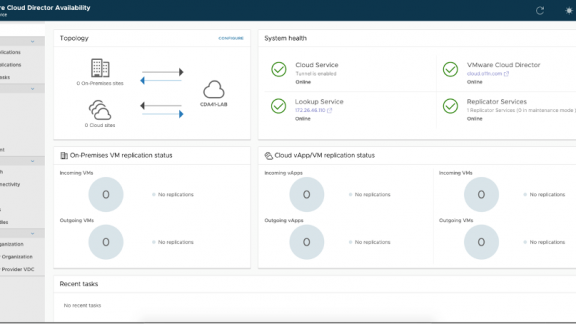
Per tutte le tipologie di erogazione, il Corsista può accedere alle attrezzature e ai sistemi presenti nei Nostri laboratori o direttamente presso i data center del Vendor o dei suoi provider autorizzati in modalità remota. Ogni partecipante dispone di un accesso per implementare le varie configurazioni avendo così un riscontro pratico e immediato della teoria affrontata. Ecco di seguito alcuni scenari tratti dalle attività laboratoriali:
Dettagli del corso
Prerequisiti
- Si consiglia la partecipazione al Corso VMware VCP-DCV.
Durata del corso
- Durata Intensiva 5gg;
Frequenza
Varie tipologie di Frequenza Estensiva ed Intensiva.
Date del corso
- Corso VMware Cloud Director: Install Configure Manage [v10.6] (Formula Intensiva) – Su richiesta – 9:00 – 17:00
Modalità di iscrizione
Le iscrizioni sono a numero chiuso per garantire ai tutti i partecipanti un servizio eccellente.
L’iscrizione avviene richiedendo di essere contattati dal seguente Link, o contattando la sede al numero verde 800-177596 o inviando una richiesta all’email [email protected].